
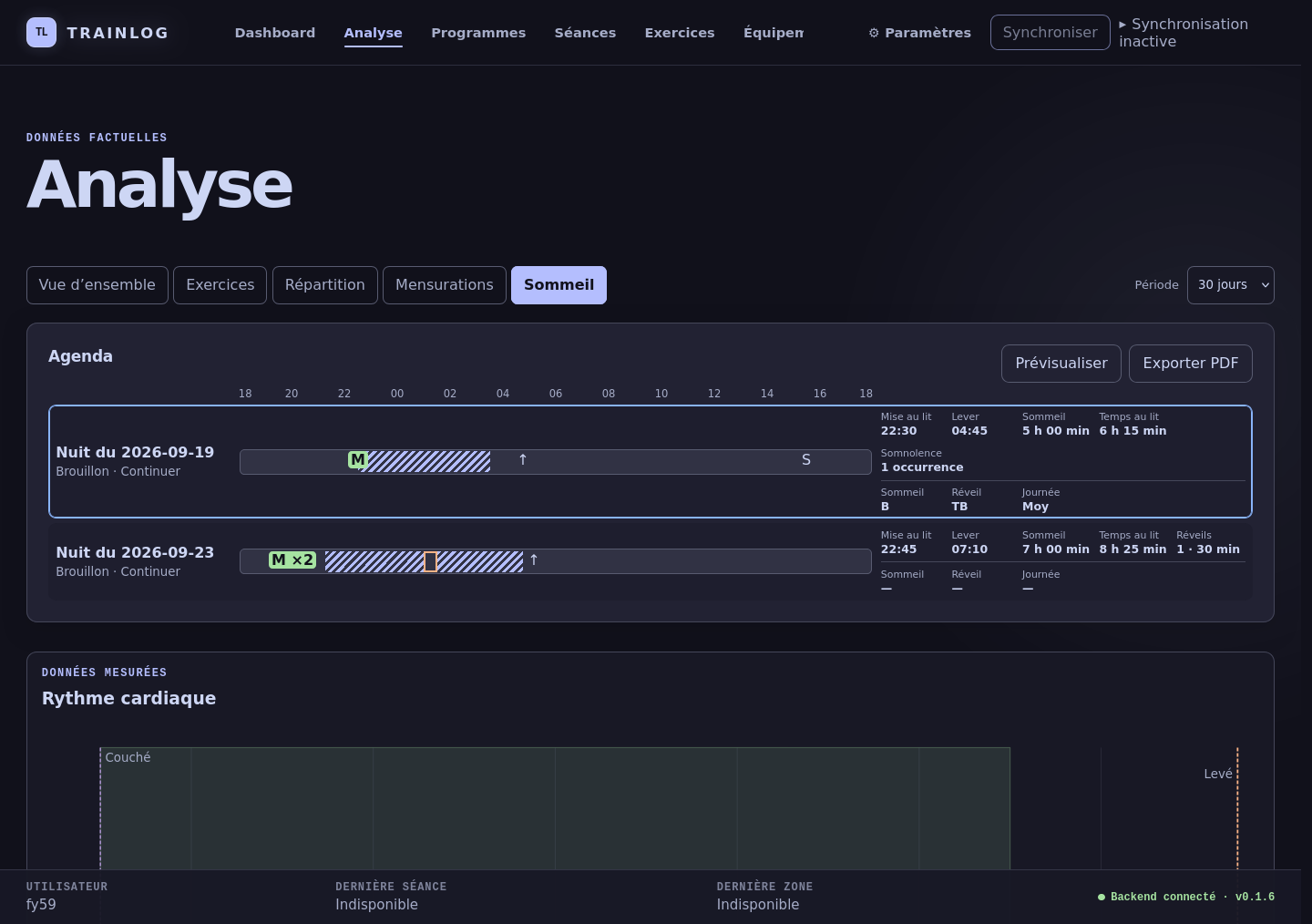
Web Analyse in the 0.1.6 development line — synchronized Sleep facts and measured heart-rate data on one timeline.
The repository currently tracks real-browser evidence for the Web interface. Its Android overview asset is a clearly labelled static design study with fictional data, not a runtime screenshot; no current TUI screenshot is tracked. Those assets are therefore not presented here as product captures. ## ✦ Features | Area | Available in the current development tree | | -------------------- | --------------------------------------------------------------------------------------------------------------------------------------------------------------------------------------------- | | **Training capture** | Metadata-driven sets, repetitions, durations and continuous activities; heterogeneous actual sets; durable active draft; exercise timelines; explicit measured MAX results. | | **Planning** | Manual preparations, imported Programs, Android delivery, execution provenance and strict separation between targets and facts. | | **Context** | Exercise and equipment catalogues, BODY ZONES, body measurements, immediate feedback, wording revisions and J+1 follow-ups. | | **Cardio** | Android BLE heart-rate acquisition, factual BPM/RR history, cardio sessions, measured calibration and fresh-signal phase guidance. | | **Sleep** | One-tap Android capture, causal Sleep Diary revisions, medication occurrences, synchronized factual timelines and local vector PDF export. | | **Desktop** | C17 Core, canonical SQLite history, keyboard-first Notcurses administration, correction, statistics, graphs and synchronization diagnostics. | | **Local Web** | Loopback-only Dashboard, Analyse, Programmes, Sessions, Exercises, Equipment, Settings and synchronization surfaces backed by typed Core services. | | **Synchronization** | One generation/ACK business engine over authenticated Bluetooth Classic RFCOMM, direct USB/MTP recovery and a separately configured private Drive workflow; SQLite files are never exchanged. | ### Boundaries and work in progress - `TRAINLOG_FORMAT_V1` remains frozen. The active mobile snapshot is V3; V1 and V2 remain readable, while V4 codecs are staged but not selected by the active transport. - Full-generation synchronization is deployed only behind a trusted local opt-in; the default automatic exchange remains V3. - AI history export is active. AI session proposals still have a pending real Drive plus Android-triggered bidirectional smoke test. - Session Generator V1 is implemented but hidden while the V2 planning model is developed. - Web Analyse is implemented; its recorded visual-review gate remains open. The canonical status and limitations live in [`docs/current_state.md`](docs/current_state.md); future work belongs in the [`roadmap`](docs/roadmap.md). ## ✦ Architecture ```text ┌──────────────────────────────┐ │ Android field companion │ │ private SQLite capture store │ └──────────────┬───────────────┘ │ versioned JSON generations + acknowledgements │ Bluetooth RFCOMM primary · direct USB/MTP recovery ▼ ┌──────────────────────────────┐ optional, separately configured │ Synchronization orchestration│◄───── private Drive workflow └──────────────┬───────────────┘ │ typed imports, commands and read models ▼ ┌──────────────────────────────┐ │ Trainlog Core · C17 │ │ desktop SQLite = canonical │ │ long-term history │ └──────────────┬───────────────┘ │ ┌──────┴──────────┐ ▼ ▼ ┌──────────────┐ ┌──────────────────────┐ │ Notcurses TUI│ │ 127.0.0.1 Web adapter│──► browser └──────────────┘ └──────────────────────┘ ``` The TUI, Web application, and Android client are sibling adapters with different responsibilities. Business rules, calculations, persistence, and typed read models belong to Core; presentation code does not reconstruct them from raw database tables. See the full [`architecture contract`](docs/architecture.md). ## ✦ Your data, your system - Trainlog runs on the user's own Android and Linux systems; no hosted Trainlog account or proprietary cloud service is required for core capture, history, analytics, or direct synchronization. - Android and desktop each keep a local SQLite database; the desktop database is the canonical long-term history. - Devices exchange bounded, versioned JSON artifacts—not database files. - The local Web server binds to `127.0.0.1` by default and never silently falls back to a LAN address or another port. - Direct Android storage uses `Documents/Trainlog`; desktop USB access uses `libudev` and `libmtp` without requiring a GVFS/FUSE mount. - The optional Drive path is operator-configured through external `rclone`. Android holds no cloud credentials. ## ✦ Build and run ### Desktop and TUI The desktop build requires Meson, Ninja, a C17 toolchain, `pkg-config`, Python 3, and development files for SQLite, libuuid, utf8proc, libudev, libmtp, Notcurses Core, GNU libmicrohttpd, and yyjson. ```bash meson setup build meson compile -C build meson test -C build --print-errorlogs ./build/tui/trainlog ``` The desktop database is stored at `$XDG_DATA_HOME/trainlog/trainlog.db`, or `~/.local/share/trainlog/trainlog.db` when `XDG_DATA_HOME` is unset. ### Embedded local Web application Node and npm are build-time dependencies only. Meson does not download npm packages. ```bash cd web npm ci npm run typecheck npm test cd .. meson setup build-web -Dweb=enabled meson compile -C build-web ./build-web/tui/trainlog --web ``` The Web application listens on `127.0.0.1:8080` by default. Use `--port